
Contact
Where to go depends on what you need.
Updated 19 September 2026 · Independent information, not the operator
Where you should go depends on what you need. Most questions about accounts, payments and games can only be answered by the platform itself, because PH Sabong is an independent information website and cannot see or change your account.
Account, deposit or withdrawal problem
Log in, tap Help and start a live chat. Fill in your account number or email, your name and your question. See how live chat support works.
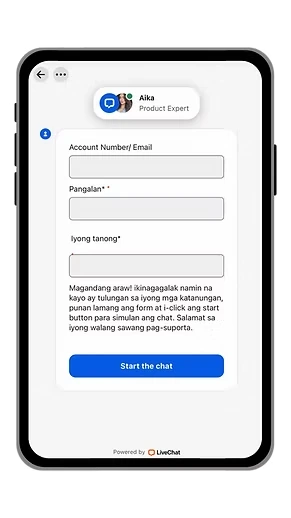
Live chat support in the app
If a deposit is pending, a withdrawal is slow or you cannot log in, open Help in the app and start a live chat. A support agent replies in the chat window.
- Fill in your account number or email.
- Add your name and your question.
- Tap Start the chat.
Which page helps with what
- Cannot sign in: Login and Password recovery.
- Deposit questions: How to cash in.
- Cash out questions: Withdrawals.
- Understanding the screen: PH Sabong Live and Meron vs Wala.
- Safety: Account security.
Before you contact support
- Write down your account number or registered email.
- Take a screenshot of any error message.
- For payments, keep the receipt and the time of payment.
- Check the status in Credits, then Transactions.
How to write a good message
Keep it short and factual. Say what you tried, what happened and what you expected. For example: "I deposited 500 through EPLAY (via QR Ph) at 8:15 pm. GCash shows it as paid but my credits are still 0. Screenshot attached." Clear messages get clearer answers.
Website feedback and corrections
Found an error or an outdated figure on this website? We review every page regularly and update the date shown near the top. Please note the page address and what should change when you send feedback.
Beware of impersonators
People on Facebook, Telegram and SMS pretend to be support or to be this website. We will never ask for your password, OTP or e-wallet PIN and we will never ask you to send money. If someone does, ignore them. Read account security.
Privacy
This website has no forms or accounts. See our privacy policy for how we use analytics.
If you need urgent support
If gaming is hurting your finances or mental health, please talk to someone you trust and read responsible gaming. In the Philippines you can call the NCMH crisis hotline at 1553 or 0917 899 8727.Response times and expectations
Live chat is the fastest way to reach the platform because it happens inside your account, where support can see your details. Response times depend on how busy support is and on the payment outlet involved. A pending deposit or withdrawal may simply need the processing time shown in the app to pass. Check Credits and Transactions first, then contact live chat if the status has not changed after that time.
What not to send
Never send your password, OTP or e-wallet PIN to anyone in a chat, an email or a message. Do not send photos of your ID to anyone outside the official chat. Do not send money to a person who says they can speed up a payment or release a withdrawal. If a request feels unusual, stop and check with the official chat inside your account.
Report a fake page or fake support
If you see a page that copies this site or the platform, or a person pretending to be support, do not enter your details. Report the page to the platform through live chat and warn others who might be affected. Fake pages often appear in Facebook groups and messaging apps.
Common questions we cannot answer
We cannot tell you whether a deposit was received, whether a withdrawal was approved or why an account was locked. Those details sit with the platform. We also cannot recover lost passwords or reverse payments. What we can do is explain the steps, help you prepare the right information and point you to the correct page, so that your message to support is clear and complete the first time.
Language
Our pages are written in English with Filipino terms explained. The chat form on the platform appears in Filipino, and you can write in the language that is easier for you. Short sentences and clear details help in any language.
>