
Live Chat Support
Stuck on a deposit, a withdrawal or a login? The fastest route is the live chat inside the platform.
Updated 19 September 2026 · Independent information, not the operator
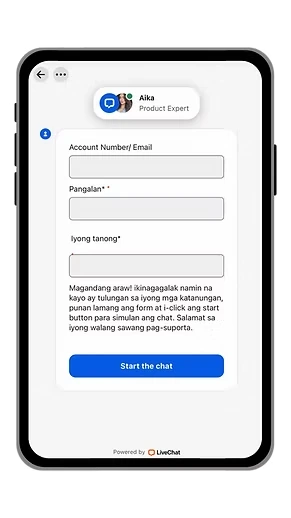
Live chat support in the app
If a deposit is pending, a withdrawal is slow or you cannot log in, open Help in the app and start a live chat. A support agent replies in the chat window.
- Fill in your account number or email.
- Add your name and your question.
- Tap Start the chat.
Where to find live chat
Log in and tap Help in the bottom menu. A chat window opens with a short form. Fill in your account number or email, your name and your question, then tap Start the chat. A support agent will reply in the same window.
What to send in your first message
- Your account number or registered email.
- Your name.
- The problem in one or two clear sentences.
- For payments: the amount, the time and a screenshot of your GCash receipt.
- For login problems: the exact message you see on screen.
What live chat can help with
- Pending or missing deposits.
- Delayed withdrawals.
- Password recovery and locked accounts.
- Questions about game results and the rules of the platform.
Avoid fake support
Scammers pretend to be support on Facebook, Telegram and SMS. Real support does not ask for your password, OTP or GCash MPIN. It will not ask you to send money to a personal number. Only use the Help chat inside your account.
Tips for a faster answer
Send all the details at once instead of one line at a time. Stay in the chat window until the agent answers. Keep your screenshots ready. Be polite, since the agent can help you more quickly when the request is clear.
PH Sabong is an independent information site. We cannot see or change your account, so please use the platform chat for account questions. See also how to cash in, withdrawals and password recovery.
A sample message you can copy
"Hello, my account number is (number). My name is (name). I deposited 500 through EPLAY (via QR Ph) at 8:15 pm today. GCash shows the payment as successful but my credits are still 0. I have attached the receipt. Please check."
The chat form text appears in Filipino, and you can write in the language you are comfortable with. Keep the message polite and complete.
What support can and cannot do
Support can check the status of your deposits and withdrawals, explain platform rules and help with account access. Support cannot guarantee a win, change the result of a game or ignore verification rules that protect your account. If an answer is unclear, ask a follow-up question and keep your reference details.
If the issue is not solved
- Reply in the same chat, not with a new one, so the history stays together.
- Ask politely for the status or the next step.
- Keep screenshots of the conversation.
- Try again after the processing time shown in the app has passed.
Keep your chat private
Do not post screenshots of your chat, account number or payment receipts in public groups. Scammers use this information to pretend they are you or to pretend they are support.
Live chat and your safety
Use live chat when you notice something unusual, such as a login from a device you do not know, a payment you did not make or a change you did not request. Report it quickly and give the time you noticed it. The sooner support knows, the more they may be able to check. Then change your password and read our account security tips.
Live chat for game questions
You can also use live chat to ask how a game or a rule works, for example what happens to bets when a game is cancelled. Ask before you play, not after. Clear answers from the platform are better than guessing.
Live chat checklist
- Logged in from the official page.
- Account number or email ready.
- Name as registered.
- Screenshot ready.
- Message written clearly and politely.
- Nobody else has your password or OTP.
When to use live chat
Use it whenever money, access or a rule is involved: a deposit that did not arrive, a withdrawal that is late, a login you cannot fix or a game result you do not understand. For everything else, our other pages already have the answer, so start with the FAQ and then open the chat if you still need help.
Log in and open Help