
PH Sabong Password Recovery
Locked out? Most people are back in within a few minutes.
Updated 19 September 2026 · Independent information, not the operator
Forgetting a password happens to everyone. Most people get back in within a few minutes. This page shows the fastest route and what to do when the usual reset does not work.
Reset your password yourself
- Open the login page and choose the forgot password option.
- Enter your registered email or mobile number.
- Follow the code or link you receive.
- Set a new password of ten or more characters.
- Log in with the new password.
Before you reset
- Try your password again slowly. Check Caps Lock and any extra space.
- Check whether your browser saved an older password that you can use.
- Make sure you are on the official page.
- Make sure you can open the email or read the SMS that will be used for recovery.
The reset code does not arrive
Check your mobile signal. Wait two minutes and try again. If it is email, look in your spam and promotions folders. Make sure the email address is spelled correctly. Do not request many codes in a row, because that can delay delivery.
Contact live chat
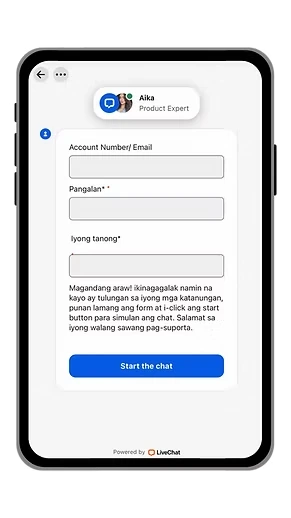
If the reset does not work, open the live chat inside the platform. Fill in the form: your account number or email, your name and your question. The support agent will guide you from there. The chat form is shown below.
What to prepare for support
- Your username or account number.
- The email or mobile number you used to register.
- Your full name as registered.
- A short description of what happens when you try to reset.
- A screenshot of the error message.
You no longer have your email or number
If you lost access to the number or email you used to register, tell live chat exactly that. They may ask for other proof that the account is yours. Do not send your documents to anyone outside the official chat.
Warning: recovery scams
Fake support accounts on social media target people who post that they forgot a password. They ask for your OTP or ask you to pay a fee. Do not answer them. Support will never ask for your password, your OTP or your e-wallet PIN. Read account security for more.
How to avoid forgetting again
- Use a password manager.
- Write it down and keep it in a safe place at home, not on your phone screenshot.
- Keep your email and mobile number up to date.
- Use a memorable long sentence instead of a short random one.
After you get back in
Log out and log back in once to check the new password. Then review your recent transactions in Credits. If you see something you did not do, contact live chat support right away. When you are ready to play again, remember your budget and time limit, and see responsible gaming.
Choosing a new password that you will remember
A good password is long, not tricky. Think of a sentence such as three unrelated words and a number that mean something to you. Do not use your birthday, your mobile number, your name or simple patterns like 123456. Type the new password twice on purpose, then log in straight away to confirm it works. If your browser offers to save it on your own private phone, that is fine. On shared devices, choose not to save it. Change the password again if you ever suspect somebody saw it.
Quick recovery checklist
- Correct site, correct address.
- Correct email or number.
- Strong signal.
- Code entered before it expires.
- New password saved safely.
- Live chat contacted if anything fails.
Follow this list in order and most problems are solved without waiting for anyone.
Back to loginHow do I reset my password?
Use the forgot password option on the login page and follow the code or link sent to your registered email or number.
The reset code does not arrive. What now?
Check your signal or spam folder, wait a couple of minutes, then try again or contact live chat.
Will support ask for my password?
No. Never share your password, OTP or e-wallet PIN with anyone.
I lost access to my email or number. Can I still recover the account?
Tell live chat what happened. They may ask for other proof that the account is yours.