
PH Sabong Withdrawals
Cash out from the same place you cash in: the Credits tab.
Updated 19 September 2026 · Independent information, not the operator
Cashing out is as important as cashing in. This page explains where withdrawals start, what to check before you confirm and what to do if the money is late. Screens and limits can change, so use the figures in your own account as the final word.
How to withdraw
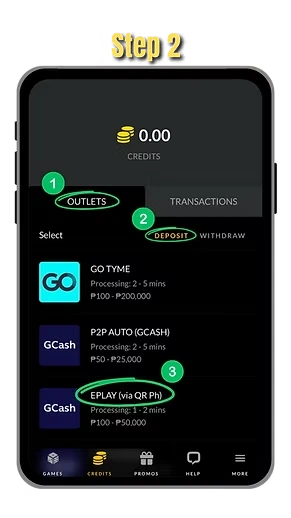
- Log in and tap Credits in the bottom menu.
- Open Outlets and switch from Deposit to Withdraw.
- Choose the outlet you want, such as an e-wallet.
- Enter the amount and your account details.
- Check everything, then confirm.
- Track the status in Transactions, under the Withdraw tab.
Check before you confirm
- The account name. The e-wallet or bank account should be in your own name, the same name as your platform account.
- The number. Read it twice. One wrong digit can send money to the wrong person, and it can be hard to get back.
- The amount. Stay inside the outlet's minimum and maximum. The app shows them on the outlet screen.
- Your credits. Make sure the balance you want to withdraw is available.
Why the name must match
Platforms usually match the name on your payout account with the name on your gaming account. This helps stop fraud and protects you if your login is ever stolen. Use only your own e-wallet or bank account. Do not ask a friend or relative to receive your withdrawal.
Verification
Some platforms may ask you to verify your identity before a first withdrawal or before a large one. This is common with financial services. Have a valid ID ready. Only send documents through the official channel inside your account, never to a person who messages you on social media.
How long does it take?
The outlet screen usually shows a processing time. Wait for that time before you worry. A pending withdrawal is not a lost withdrawal. E-wallets and banks can also add their own delay, for example during maintenance hours.
If a withdrawal is delayed
- Open Transactions and the Withdraw tab and read the status.
- Wait for the processing time shown for that outlet.
- Check that the e-wallet or bank account is active and can receive money.
- If it is still pending, open live chat support and send your account number or email, your name, the amount, the time you requested it and a screenshot.
Decide your cash-out plan before you play
Players who cash out only when they are emotionally "done" tend to keep playing until the credits are gone. Set a target and a limit before you start. If you reach your target, withdraw part or all of it and log out. Treat any money you withdraw as a result of a game of chance, not a steady income, and do not count on it for rent, food or loans.
Stay safe
- Withdraw only through the Outlets screen inside your account.
- Ignore anyone who says you must pay a fee first to release your money.
- Do not share your OTP or e-wallet PIN with anyone.
Related pages
Need to load credits? See how to cash in. Secure your account with our account security tips. If you feel that gaming is getting out of hand, read responsible gaming.
Common mistakes with withdrawals
- Requesting a second withdrawal while the first is still pending. Wait until the first shows a final status.
- Using an e-wallet that is not fully set up or that has reached its own monthly limit.
- Trying to withdraw money that came from a deposit you have not played, when the platform rules do not allow it. Read the rules in the app first.
- Sending screenshots to strangers who offer to speed things up.
If something is unclear, ask live chat before you press confirm. A short question is better than a long dispute later.
Log in to withdrawWhere do I withdraw?
Log in, open Credits, then Outlets, and switch to Withdraw.
Why must the account name match?
Payout accounts are usually matched to your registered name to prevent fraud.
My withdrawal is still pending. What should I do?
Wait for the time shown for the outlet. If it is still pending, contact live chat with your details and a screenshot.
Should I pay a fee to release my withdrawal?
No. Be careful of anyone who asks for an upfront fee. Use only the official chat inside your account.